Skip to content
WXP Plugins

Plugins

WXP Restaurant Menu

WXP Opening Times

WXP Local Events

WXP Restaurant Reservations

Demo

Pricing

Support

Docs

FAQ

Buy

Menu

Plugins

- WXP Restaurant Menu

- WXP Opening Times

- WXP Local Events

- WXP Restaurant Reservations

Demo

Pricing

Support

- Docs

- FAQ

Buy

WXP Opening Times

8
  • Installation
    • Installing WXP Opening Times
  • Basic operations
    • Creating your (first) schedule
    • Setting exceptions
  • For developers
    • Filter- and action hooks
    • Twig templates
    • WXP Opening Times shortcodes
  • Jewish and Islamic holidays
    • Installation
      • Installing WXP Opening Times: Jewish and Islamic holidays
    • For developers
      • Jewish and Islamic holidays: for developers

WXP Restaurant Menu

22
  • Installation
    • Installing WXP Restaurant Menu
  • Basic operations
    • Understanding the concept
    • The Settings for the WXP Restaurant Menu Plugin
    • The Icon menu
    • The Sets Menu
    • The Tags Menu
    • The Groups Menu
    • The Categories menu
    • Adding the ‘Menu Items’ (Dishes)
  • Visual Elements
    • General info
      • The Restaurant Menu Element
      • Menu Selection Element
    • Shortcodes
      • WXP Restaurant Menu shortcodes
    • Elementor
      • WXP Plugins Elementor Widgets
      • Elementor Menu Page Widget
      • Elementor Menu Page Widget style settings
      • Elementor Menu Selection Element
    • WordPress Blocks
      • WXP Plugins WordPress Blocks
      • WordPress Restaurant Menu Block
      • Menu Selection Block
  • For developers
    • Filter- and action hooks
    • Twig templates
    • WXP Restaurant Menu shortcodes

WXP Local Events

18
  • Installation
    • Installing WXP Local Events
  • Basic operations
    • Understanding the concept
    • Settings for the WXP Local Events plugin
    • Categories
    • Events – The overview
  • Visual Elements
    • General info
      • The Events Calendar Element
      • The Event Registration Form Element
      • The Events Custom Post Type
    • Shortcodes
      • WXP Local Events shortcodes
    • Elementor
      • WXP Plugins Elementor Widgets
      • The Events Calendar Widget
  • For developers
    • Filter- and action hooks
    • Twig templates
    • WXP Local Events shortcodes
  • Add ons
    • Local Events for WooCommerce
      • Installation
        • Installing WXP Local Events for WooCommerce
      • For developers
        • Local Events for WooCommerce: for developers
    • Events Feed
      • Installation
        • Installing WXP Events Feed
      • For developers
        • Events Feed: for developers

WXP Restaurant Reservations

8
  • Installation
    • Installing WXP Restaurant Reservations
  • Basic operations
    • Understanding the concept
    • The settings for the WXP Restaurants Reservations plugin
  • For developers
    • Filter- and action hooks
    • Twig templates
    • WXP Restaurant Reservations shortcodes
  • Rooms
    • Installation
      • Installing WXP Restaurant Bookings: Rooms
    • For developers
      • Rooms: for developers

General Developer Information

1
  • Twig
    • Twig templates in the WXP plugins

WXP Agency Kit

1
  • WXP Agency Kit: demo content from the command line

Introduction

1
  • Documentation WXP Plugins
View Categories
  • Home
  • Documentation
  • WXP Local Events
  • Visual Elements
  • General info
  • The Events Calendar Element

The Events Calendar Element

1 min read

0:00 / 1:08

WXP Local Events has two elements and one Custom Post Type (CPT). The two elements can be shown in three different ways. Via Elementor Widgets, Gutenberg Blocks or WordPress Shortcodes. The easiest way to use them is via Elementor Widgets or Gutenberg Shortcodes. Whatever you use, the final result will be the same.

The Events Calendar #

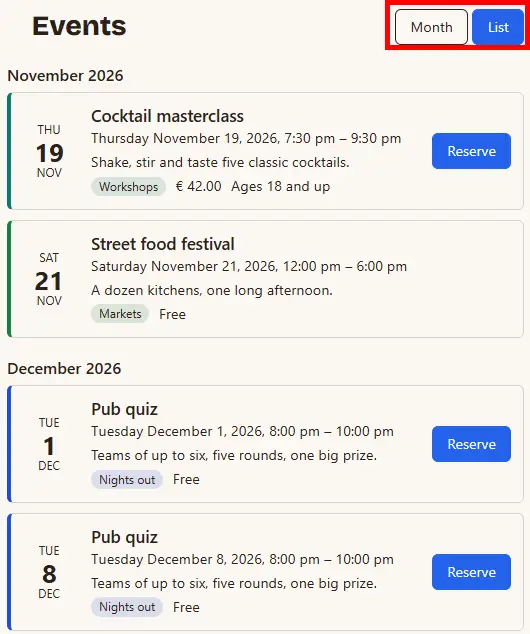
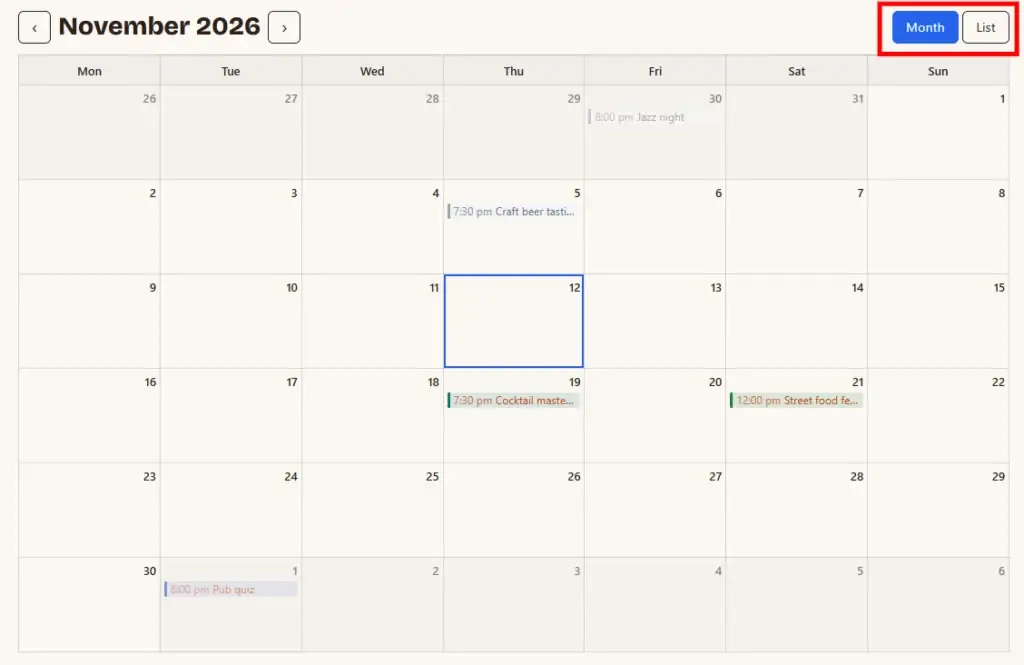
The Events Calendar can be presented in two different ways. As a calendar or as a list. It’s also an option to make the way the events are shown selectable by the user.

When you look at the WXP Local Events calendar, you’ll notice the option to browse through the months. This option is lacking in the list. Instead of that, you can set the maximum of events to be shown in the list.

The Events Calendar as a calendar #
event calendar

The Events Calendar as a list #

local events list

Server-filtering the events #

It is possible to show only events belonging tot (a) certain categorie(s). In this way it’s possible to have multiple event calendars on the same website. Imagine for example a camping, where they have one page with events for the kids, another page with sporting events and a third page with culinary events.

Updated on November 12, 2026

What are your Feelings

  • Happy
  • Normal
  • Sad

Share This Article :

  • Facebook
  • X
  • LinkedIn
  • Pinterest
The Event Registration Form Element
Table of Contents
  • The Events Calendar
    • The Events Calendar as a calendar
    • The Events Calendar as a list
    • Server-filtering the events
WXP Plugins

Demo

Pricing

Affiliates

© 2026 WXP Plugins. All prices are in euro, excluding VAT.

WXPPlugins is a brand of WP Digital Marketing - The Netherlands - Chamber of Commerce (KvK) 75580152