
Skip to content
WXP Plugins

Plugins

WXP Restaurant Menu

WXP Opening Times

WXP Local Events

WXP Restaurant Reservations

Demo

Pricing

Support

Docs

FAQ

Buy

Menu

Plugins

- WXP Restaurant Menu

- WXP Opening Times

- WXP Local Events

- WXP Restaurant Reservations

Demo

Pricing

Support

- Docs

- FAQ

Buy

WXP Opening Times

8
  • Installation
    • Installing WXP Opening Times
  • Basic operations
    • Creating your (first) schedule
    • Setting exceptions
  • For developers
    • Filter- and action hooks
    • Twig templates
    • WXP Opening Times shortcodes
  • Jewish and Islamic holidays
    • Installation
      • Installing WXP Opening Times: Jewish and Islamic holidays
    • For developers
      • Jewish and Islamic holidays: for developers

WXP Restaurant Menu

11
  • Installation
    • Installing WXP Restaurant Menu
  • Basic operations
    • Understanding the concept
    • The Settings for the WXP Restaurant Menu Plugin
    • The Icon menu
    • The Sets Menu
    • The Tags Menu
    • The Groups Menu
    • The Categories menu
  • For developers
    • Filter- and action hooks
    • Twig templates
    • WXP Restaurant Menu shortcodes

WXP Local Events

8
  • Installation
    • Installing WXP Local Events
  • For developers
    • Filter- and action hooks
    • Twig templates
    • WXP Local Events shortcodes
  • Local Events for WooCommerce
    • Installation
      • Installing WXP Local Events for WooCommerce
    • For developers
      • Local Events for WooCommerce: for developers
  • Events Feed
    • Installation
      • Installing WXP Events Feed
    • For developers
      • Events Feed: for developers

WXP Restaurant Reservations

6
  • Installation
    • Installing WXP Restaurant Reservations
  • For developers
    • Filter- and action hooks
    • Twig templates
    • WXP Restaurant Reservations shortcodes
  • Rooms
    • Installation
      • Installing WXP Restaurant Bookings: Rooms
    • For developers
      • Rooms: for developers

General Developer Information

1
  • Twig
    • Twig templates in the WXP plugins

WXP Agency Kit

1
  • WXP Agency Kit: demo content from the command line
View Categories
  • Home
  • Documentation
  • WXP Restaurant Menu
  • Basic operations
  • The Categories menu

The Categories menu

< 1 min read

0:00 / 0:35
  • View as Markdown Open this page as plain Markdown (opens in a new tab)
  • Open in ChatGPT Ask questions about this page (opens in a new tab)
  • Open in Claude Ask questions about this page (opens in a new tab)
  • Open in Google AI Studio Ask questions about this page (Google account required) (opens in a new tab)

The function of the categories #

The categories are meant to present the complete menu in a logical ordering. Each category can have one or more sub-categories. For example ‘Starters’ often can be subdivided in for example ‘Soups’, ‘Cold starters’ and ‘Hot starters’.

Adding categories #

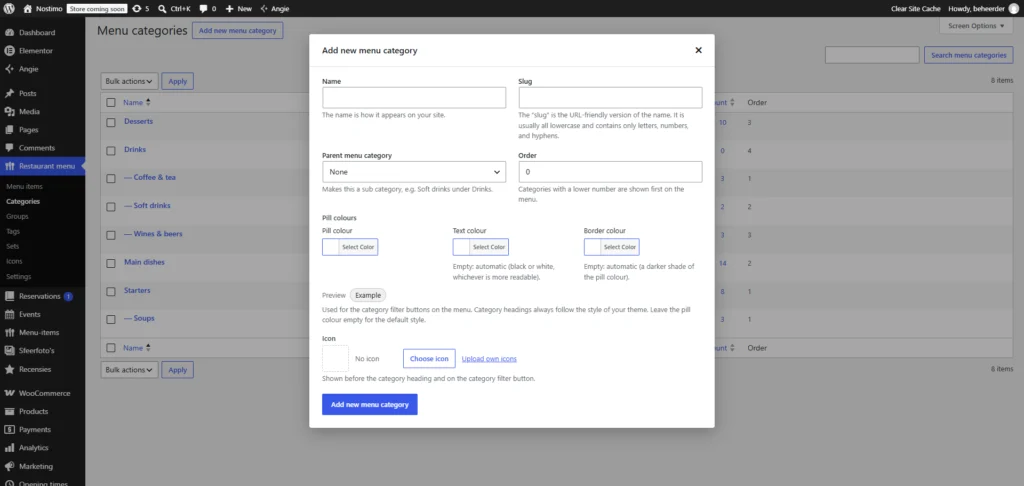
In many ways the ‘Categories’ menu is like the groups menu, with only one extra option, the ‘Order’ field. This is meant to present the menu-items in a logical grouping. After all, you do not want to have your menu card to start with the desserts. The lower numbers come first, the higher numbers will be showed later.
Updated on November 4, 2026

What are your Feelings

  • Happy
  • Normal
  • Sad

Share This Article :

  • Facebook
  • X
  • LinkedIn
  • Pinterest
The Groups MenuUnderstanding the concept
Table of Contents
  • The function of the categories
    • Adding categories
WXP Plugins

Demo

Pricing

© 2026 WXP Plugins. All prices are in euro, excluding VAT.

WXPPlugins is a brand of WP Digital Marketing - The Netherlands - Chamber of Commerce (KvK) 75580152