
WXP Opening Times
Open or closed, always right on the page.
Show your opening times with a live Open or Closed badge. It handles lunch breaks, holidays and special dates for you.
Features
Hours that look after themselves
Set them once. The page stays correct.
Weekly times in a few clicks
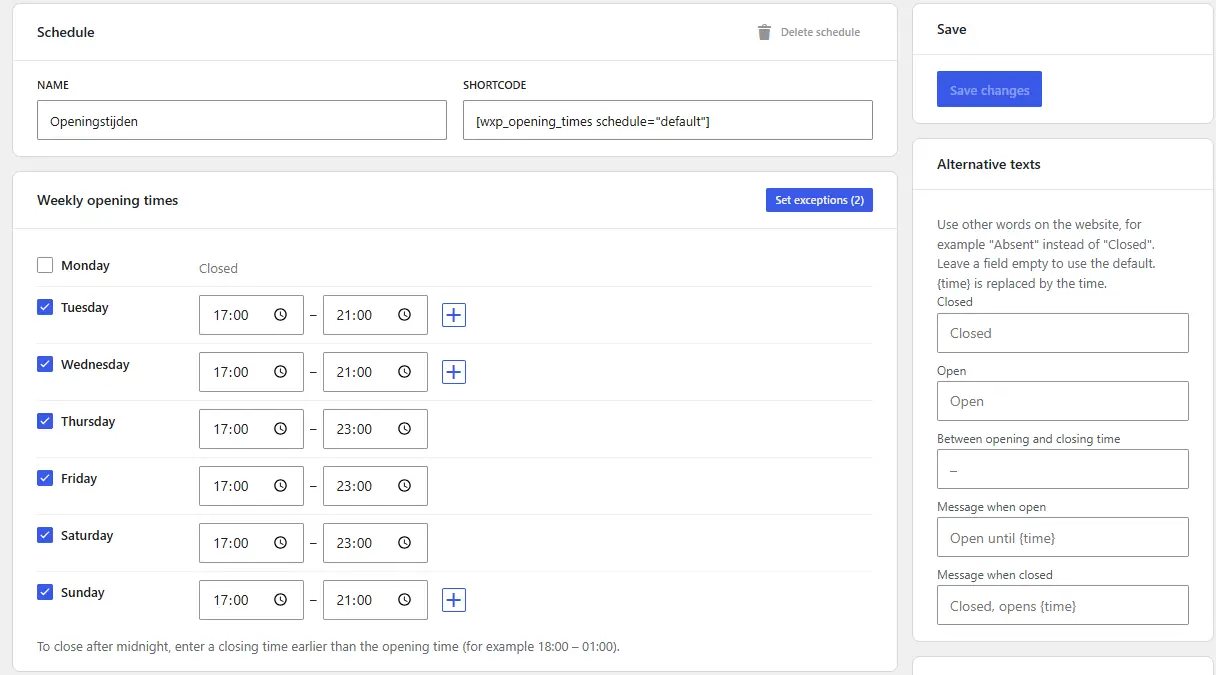
Tick the days, add a second set of times for a lunch break, and use closing times after midnight.
A badge that stays correct
The Open or Closed badge updates in the browser while the visitor is on the page, also on cached pages.
Holidays and special dates
Different times for a period, such as summer hours, and rules for holidays. Easter and its related holidays are calculated for every year.
Several schedules
Keep separate schedules, for example Restaurant and Kitchen, each with its own words such as 'Absent' instead of 'Closed'.
Three templates and week browsing
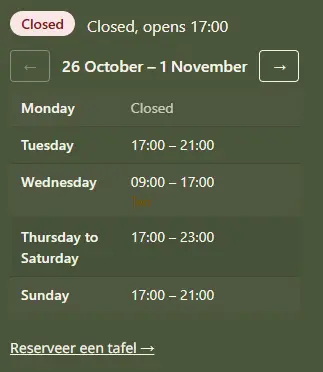
A week table, grouped days such as 'Monday to Thursday', or a single line. Visitors can browse to the next weeks.
Search engines understand it
Optional structured data tells search engines your opening hours and the exceptions of the next 365 days.
Demo
Compare the templates
The demo shows a week with a lunch break and a closed day. Switch between the three templates and see the time in the restaurant's time zone.
Open the hours demoPricing
Completely free
WXP Opening Times has no license and no yearly fee. Support is given on the WordPress.org support forum.
FAQ
Questions and answers
What restaurant owners ask about opening times.
Show the right hours today
Pick a plan, install the plugin and set your week.