
WXP Restaurant Menu
A menu your guests can browse, filter and trust.
Dishes with prices, photos and dietary labels, grouped by course. It follows your theme and works with the block editor, Elementor and a shortcode.

Features
Everything a menu needs
Easy for you to keep up to date, easy for guests to read.
Dishes with all the details
Price, photo, description, availability dates, a switch for 'not available today' and a minimum number of persons.
Categories, groups and tags
Order the menu by course, label dishes as vegetarian or gluten free, and add tags. Colours and icons are optional.
Five templates
Default, compact, cards, elegant and side by side. Your theme can add its own templates.
Filters for guests
Buttons to filter on category, dietary group and tag. The small script only loads on pages that use it.
Tabs per course
One tab for starters, mains, desserts and drinks, with keyboard support. Without JavaScript all courses show below each other.
A few dishes on your homepage
Show your favourites as a random choice, a carousel or the first dishes of the menu, on any page.
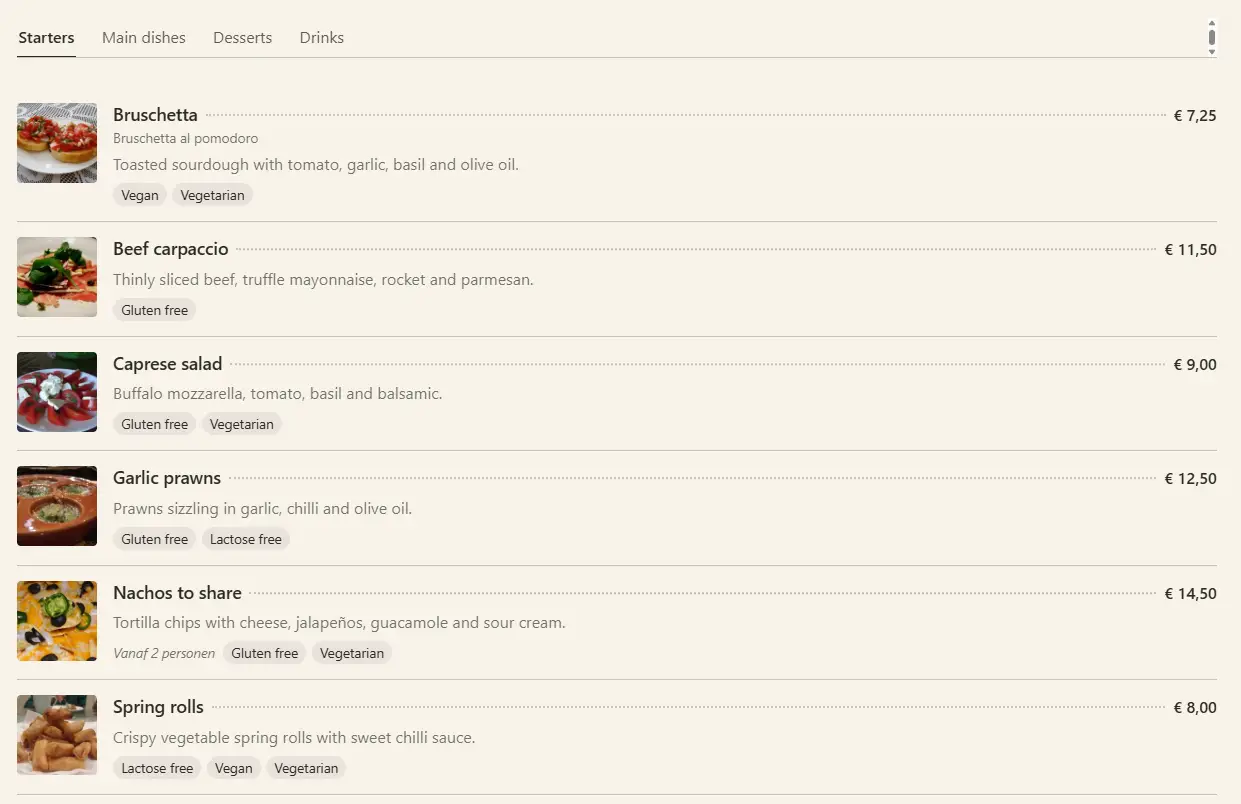
Demo
Switch the style yourself
The demo menu has a style switch. Try all five templates on the same dishes.
Open the menu demoPricing
Choose your plan
WXP Restaurant Menu is licensed per year, per plugin. Prices are in euro, excluding VAT.
Entrepreneur
€ 99
per year, excl. VAT
✓ Up to 3 sites
✓ Premium support
✓ First response within 1 working day
Designer
€ 199
per year, excl. VAT
✓ Up to 10 sites
✓ Premium support
✓ First response within 1 working day
FAQ
Questions and answers
What restaurant owners ask about the menu plugin.
Put your menu online today
Pick a plan, install the plugin and add your first dishes.