
Skip to content
WXP Plugins

Plugins

WXP Restaurant Menu

WXP Opening Times

WXP Local Events

WXP Restaurant Reservations

Demo

Pricing

Support

Docs

FAQ

Buy

Menu

Plugins

- WXP Restaurant Menu

- WXP Opening Times

- WXP Local Events

- WXP Restaurant Reservations

Demo

Pricing

Support

- Docs

- FAQ

Buy

WXP Opening Times

8
  • Installation
    • Installing WXP Opening Times
  • Basic operations
    • Creating your (first) schedule
    • Setting exceptions
  • For developers
    • Filter- and action hooks
    • Twig templates
    • WXP Opening Times shortcodes
  • Jewish and Islamic holidays
    • Installation
      • Installing WXP Opening Times: Jewish and Islamic holidays
    • For developers
      • Jewish and Islamic holidays: for developers

WXP Restaurant Menu

7
  • Installation
    • Installing WXP Restaurant Menu
  • Basic operations
    • Understanding the concept
    • The Settings for the WXP Restaurant Menu Plugin
    • The Icon menu
  • For developers
    • Filter- and action hooks
    • Twig templates
    • WXP Restaurant Menu shortcodes

WXP Local Events

8
  • Installation
    • Installing WXP Local Events
  • For developers
    • Filter- and action hooks
    • Twig templates
    • WXP Local Events shortcodes
  • Local Events for WooCommerce
    • Installation
      • Installing WXP Local Events for WooCommerce
    • For developers
      • Local Events for WooCommerce: for developers
  • Events Feed
    • Installation
      • Installing WXP Events Feed
    • For developers
      • Events Feed: for developers

WXP Restaurant Reservations

6
  • Installation
    • Installing WXP Restaurant Reservations
  • For developers
    • Filter- and action hooks
    • Twig templates
    • WXP Restaurant Reservations shortcodes
  • Rooms
    • Installation
      • Installing WXP Restaurant Bookings: Rooms
    • For developers
      • Rooms: for developers

General Developer Information

1
  • Twig
    • Twig templates in the WXP plugins

WXP Agency Kit

1
  • WXP Agency Kit: demo content from the command line
View Categories
  • Home
  • Documentation
  • WXP Opening Times
  • Basic operations
  • Setting exceptions

Setting exceptions

1 min read

0:00 / 2:28
  • View as Markdown Open this page as plain Markdown (opens in a new tab)
  • Open in ChatGPT Ask questions about this page (opens in a new tab)
  • Open in Claude Ask questions about this page (opens in a new tab)
  • Open in Google AI Studio Ask questions about this page (Google account required) (opens in a new tab)

What do we mean with exceptions? #

When in your business your opening times differ through the years, it’s possible to define exceptions to the general opening times for your business.

For example, your business is closed on holidays. Or at some holidays you have extended opening hours. Instead of changing your opening times week by week, you can define exceptions to the general opening times.

The general opening times #

Let’s take the example of a restaurant in a very touristic location. Off season it might be their opening schedule would look like this :
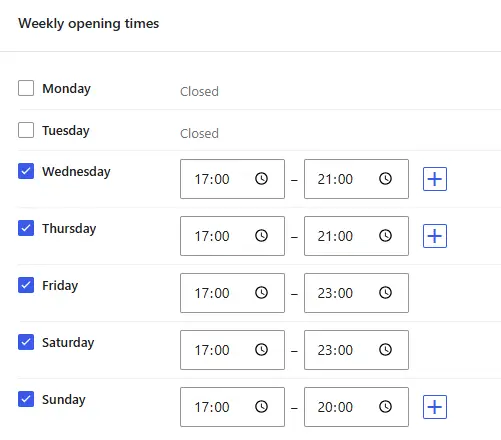
During July and August, when the tourists arrive however they open each and every day at 11:00 and close at 23:00. Instead of entering a complete new schedule it’s easy to add exceptions.

First action is to click on the ‘Set exceptions’ button. It makes the new card with exceptions appear.

Let’s play the ‘Exceptions card’ #

There are two kinds of exceptions. Exceptions based on periods (1), and exceptions based on holidays (2).

Exceptions based on periods #

To add the mentioned extended opening times to our venue, we click on ‘Add Period’.

First we have to add the period of time. We talked about the months July to August so we enter ‘From 01-07-2027 to 31-08-2027’. Both dates are inclusive. During that time we’re open from 11:00 to 23:00 on each and every day.
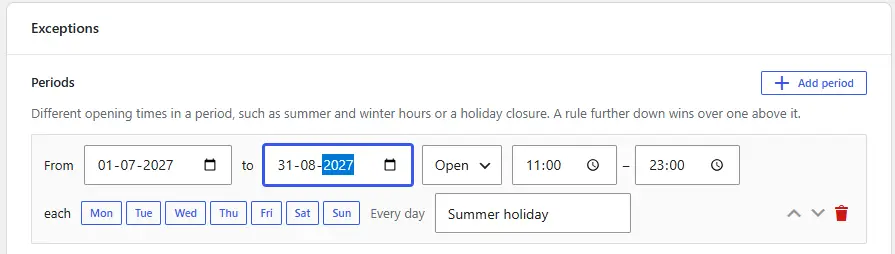
Note: We didn’t click any days, because we have the same hours for every day during summertime. When we click on the names of days, the rule is only valid for that day.

The rules are saved when the button ‘Save Changes’ is clicked. It’s at the right side on top of your page on a desktop or somewhere at the bottom on a phone or tablet.

Exceptions based on a holiday #

A restaurant also can decide that no matter on which day a certain holiday is, they open or close on that day. For example, they’re always open until 23:00 on Christmas Eve for their famous Christmas diner.

So no matter on what day it’ll be Christmas Eve, on that day they’re opened.

Non-western holidays #

The plugin has a list of most Christian and a lot of other Western holidays. Since WordPress is used all over the world, and a list with all the possible holidays all over the world would become a long list, the developer of the plugin made the choice to make the plugin extendable. It’s possible for a developer to create an add on to add holidays from their own part of the world or their culture. An add-on for Jewish and Muslim holidays will be made available soon.

Updated on October 30, 2026

What are your Feelings

  • Happy
  • Normal
  • Sad

Share This Article :

  • Facebook
  • X
  • LinkedIn
  • Pinterest
Creating your (first) scheduleCreating your (first) schedule

Leave a Reply Cancel reply

Your email address will not be published. Required fields are marked *

Table of Contents
  • What do we mean with exceptions?
    • The general opening times
    • Let's play the 'Exceptions card'
    • Exceptions based on periods
    • Exceptions based on a holiday
    • Non-western holidays
WXP Plugins

Demo

Pricing

© 2026 WXP Plugins. All prices are in euro, excluding VAT.

WXPPlugins is a brand of WP Digital Marketing - The Netherlands - Chamber of Commerce (KvK) 75580152