
Skip to content
WXP Plugins

Plugins

WXP Restaurant Menu

WXP Opening Times

WXP Local Events

WXP Restaurant Reservations

Demo

Pricing

Support

Docs

FAQ

Buy

Menu

Plugins

- WXP Restaurant Menu

- WXP Opening Times

- WXP Local Events

- WXP Restaurant Reservations

Demo

Pricing

Support

- Docs

- FAQ

Buy

WXP Opening Times

8
  • Installation
    • Installing WXP Opening Times
  • Basic operations
    • Creating your (first) schedule
    • Setting exceptions
  • For developers
    • Filter- and action hooks
    • Twig templates
    • WXP Opening Times shortcodes
  • Jewish and Islamic holidays
    • Installation
      • Installing WXP Opening Times: Jewish and Islamic holidays
    • For developers
      • Jewish and Islamic holidays: for developers

WXP Restaurant Menu

22
  • Installation
    • Installing WXP Restaurant Menu
  • Basic operations
    • Understanding the concept
    • The Settings for the WXP Restaurant Menu Plugin
    • The Icon menu
    • The Sets Menu
    • The Tags Menu
    • The Groups Menu
    • The Categories menu
    • Adding the ‘Menu Items’ (Dishes)
  • Visual Elements
    • General info
      • The Restaurant Menu Element
      • Menu Selection Element
    • Shortcodes
      • WXP Restaurant Menu shortcodes
    • Elementor
      • WXP Plugins Elementor Widgets
      • Elementor Menu Page Widget
      • Elementor Menu Page Widget style settings
      • Elementor Menu Selection Element
    • WordPress Blocks
      • WXP Plugins WordPress Blocks
      • WordPress Restaurant Menu Block
      • Menu Selection Block
  • For developers
    • Filter- and action hooks
    • Twig templates
    • WXP Restaurant Menu shortcodes

WXP Local Events

18
  • Installation
    • Installing WXP Local Events
  • Basic operations
    • Understanding the concept
    • Settings for the WXP Local Events plugin
    • Categories
    • Events – The overview
  • Visual Elements
    • General info
      • The Events Calendar Element
      • The Event Registration Form Element
      • The Events Custom Post Type
    • Shortcodes
      • WXP Local Events shortcodes
    • Elementor
      • WXP Plugins Elementor Widgets
      • The Events Calendar Widget
  • For developers
    • Filter- and action hooks
    • Twig templates
    • WXP Local Events shortcodes
  • Add ons
    • Local Events for WooCommerce
      • Installation
        • Installing WXP Local Events for WooCommerce
      • For developers
        • Local Events for WooCommerce: for developers
    • Events Feed
      • Installation
        • Installing WXP Events Feed
      • For developers
        • Events Feed: for developers

WXP Restaurant Reservations

8
  • Installation
    • Installing WXP Restaurant Reservations
  • Basic operations
    • Understanding the concept
    • The settings for the WXP Restaurants Reservations plugin
  • For developers
    • Filter- and action hooks
    • Twig templates
    • WXP Restaurant Reservations shortcodes
  • Rooms
    • Installation
      • Installing WXP Restaurant Bookings: Rooms
    • For developers
      • Rooms: for developers

General Developer Information

1
  • Twig
    • Twig templates in the WXP plugins

WXP Agency Kit

1
  • WXP Agency Kit: demo content from the command line

Introduction

1
  • Documentation WXP Plugins
View Categories
  • Home
  • Documentation
  • WXP Restaurant Menu
  • Visual Elements
  • Elementor
  • Elementor Menu Selection Element

Elementor Menu Selection Element

1 min read

0:00 / 1:33

Overview #

The settings palette of the Menu Selection widget consists of two sections at the layout tab.
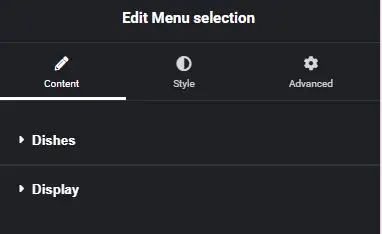
edit menu selection

Dishes #

In the ‘Dishes’ section you can select the dishes that can be shown in this menu selection.
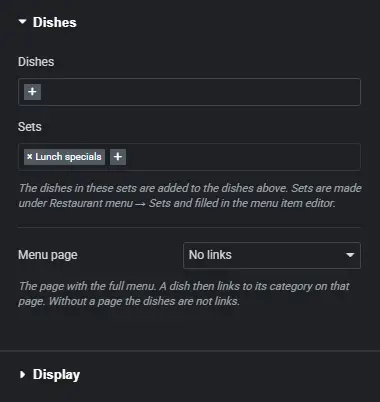
select dishes

Dishes #

When you click the plus (+) a drop down opens and you can select from the menu-items available. When you have a rather large menu, it can be a bit inconvenient to make your selections, so there is a second option available, to select the dishes via Sets

Sets #

Sets are defined in the Sets table and later assigned to specific menu items. It is a more convenient way to make your selection.

Menu page #

The ‘menu page’ is the page you’ll be directed to when the visitor clicks on the menu selector. By default it does not go anywhere.

Display #

The display section controls what your visitor will see.
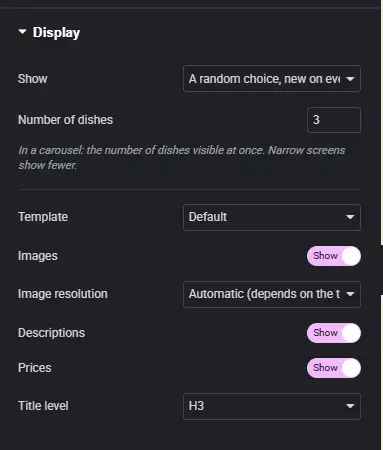
display restaurant menu selection

Show #

  • A random choice from the list. Every time the page is refreshed there is a new selection of dishes from the total number of dishes available.
  • Images for a carousel, maximum of 10
  • The first dishes in menu order.

Number of dishes #

The number of dishes to be shown. The minimum is 1, there is no defined maximum, but some templates set a maximum.

Template #

The template to use. Currently Cards, Default and Text-only

‘Cards’ is my personal favorite.

Images #

Show or hide. Please note that the setting of ‘Images’ has no effect on the ‘Text-only’ template.

Image resolution #

Set the right resolution for the image

Descriptions #

Show or hide the descriptions, default ‘Show’.

Prices #

Show or hide the prices, default ‘Show’.

Title level #

Which heading to use for the titels

Updated on November 6, 2026

What are your Feelings

  • Happy
  • Normal
  • Sad

Share This Article :

  • Facebook
  • X
  • LinkedIn
  • Pinterest
Elementor Menu Page Widget style settings
Table of Contents
  • Overview
    • Dishes
      • Dishes
      • Sets
      • Menu page
    • Display
      • Show
      • Number of dishes
      • Template
      • Images
      • Image resolution
      • Descriptions
      • Prices
      • Title level
WXP Plugins

Demo

Pricing

Affiliates

© 2026 WXP Plugins. All prices are in euro, excluding VAT.

WXPPlugins is a brand of WP Digital Marketing - The Netherlands - Chamber of Commerce (KvK) 75580152