
Skip to content
WXP Plugins

Plugins

WXP Restaurant Menu

WXP Opening Times

WXP Local Events

WXP Restaurant Reservations

Demo

Pricing

Support

Docs

FAQ

Buy

Menu

Plugins

- WXP Restaurant Menu

- WXP Opening Times

- WXP Local Events

- WXP Restaurant Reservations

Demo

Pricing

Support

- Docs

- FAQ

Buy

WXP Opening Times

8
  • Installation
    • Installing WXP Opening Times
  • Basic operations
    • Creating your (first) schedule
    • Setting exceptions
  • For developers
    • Filter- and action hooks
    • Twig templates
    • WXP Opening Times shortcodes
  • Jewish and Islamic holidays
    • Installation
      • Installing WXP Opening Times: Jewish and Islamic holidays
    • For developers
      • Jewish and Islamic holidays: for developers

WXP Restaurant Menu

22
  • Installation
    • Installing WXP Restaurant Menu
  • Basic operations
    • Understanding the concept
    • The Settings for the WXP Restaurant Menu Plugin
    • The Icon menu
    • The Sets Menu
    • The Tags Menu
    • The Groups Menu
    • The Categories menu
    • Adding the ‘Menu Items’ (Dishes)
  • Visual Elements
    • General info
      • The Restaurant Menu Element
      • Menu Selection Element
    • Shortcodes
      • WXP Restaurant Menu shortcodes
    • Elementor
      • WXP Plugins Elementor Widgets
      • Elementor Menu Page Widget
      • Elementor Menu Page Widget style settings
      • Elementor Menu Selection Element
    • WordPress Blocks
      • WXP Plugins WordPress Blocks
      • WordPress Restaurant Menu Block
      • Menu Selection Block
  • For developers
    • Filter- and action hooks
    • Twig templates
    • WXP Restaurant Menu shortcodes

WXP Local Events

18
  • Installation
    • Installing WXP Local Events
  • Basic operations
    • Understanding the concept
    • Settings for the WXP Local Events plugin
    • Categories
    • Events – The overview
  • Visual Elements
    • General info
      • The Events Calendar Element
      • The Event Registration Form Element
      • The Events Custom Post Type
    • Shortcodes
      • WXP Local Events shortcodes
    • Elementor
      • WXP Plugins Elementor Widgets
      • The Events Calendar Widget
  • For developers
    • Filter- and action hooks
    • Twig templates
    • WXP Local Events shortcodes
  • Add ons
    • Local Events for WooCommerce
      • Installation
        • Installing WXP Local Events for WooCommerce
      • For developers
        • Local Events for WooCommerce: for developers
    • Events Feed
      • Installation
        • Installing WXP Events Feed
      • For developers
        • Events Feed: for developers

WXP Restaurant Reservations

8
  • Installation
    • Installing WXP Restaurant Reservations
  • Basic operations
    • Understanding the concept
    • The settings for the WXP Restaurants Reservations plugin
  • For developers
    • Filter- and action hooks
    • Twig templates
    • WXP Restaurant Reservations shortcodes
  • Rooms
    • Installation
      • Installing WXP Restaurant Bookings: Rooms
    • For developers
      • Rooms: for developers

General Developer Information

1
  • Twig
    • Twig templates in the WXP plugins

WXP Agency Kit

1
  • WXP Agency Kit: demo content from the command line

Introduction

1
  • Documentation WXP Plugins
View Categories
  • Home
  • Documentation
  • WXP Restaurant Menu
  • Basic operations
  • Adding the ‘Menu Items’ (Dishes)

Adding the ‘Menu Items’ (Dishes)

2 min read

0:00 / 2:17

Entering Basic Data #
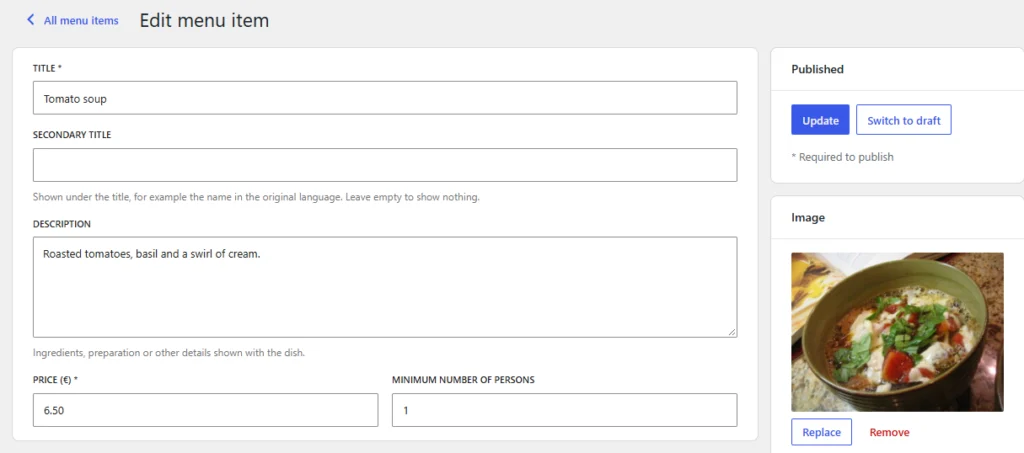
menu data 1

The page for menu items is a rather large page, so we look at it in sections. In the first section you add the most basic data for the menu items.

  • Title – The primary title for the menu item.
  • Secondary title – With foreign dishes you might want to give the menu item both a title in the original language of the food, and the language spoken in the country where the restaurant is situated. So you can choose for -for example ‘Tomato Soup’ as the main title, with as a subtitle -when it would be for example a Greek restaurant- Ντοματόσουπα (domatósoepa)
  • Description – The description of the menu item
  • Price – The Price
  • Minimum number of persons – Some dishes are only served when there is a minimum number of people in the company. Default 1 is suggested, but when a dish is only served when there are 2 people or more, you could enter here 2.
  • Image – Image to be shown on the menu. When there is no image, only the text will be shown.

Category, groups and tags #

The next section is the section to set Category, groups and tags. Only Categories are required, the other labels are not.
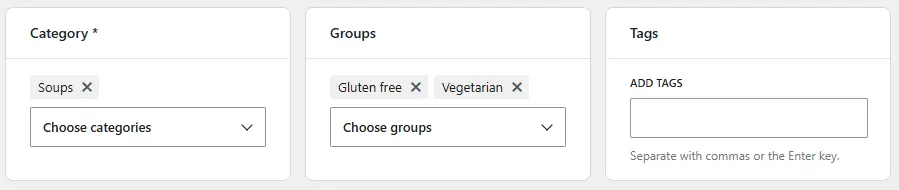
You can select one or more of each labels from each type.

When the list is very long, you can use the search function to filter the results
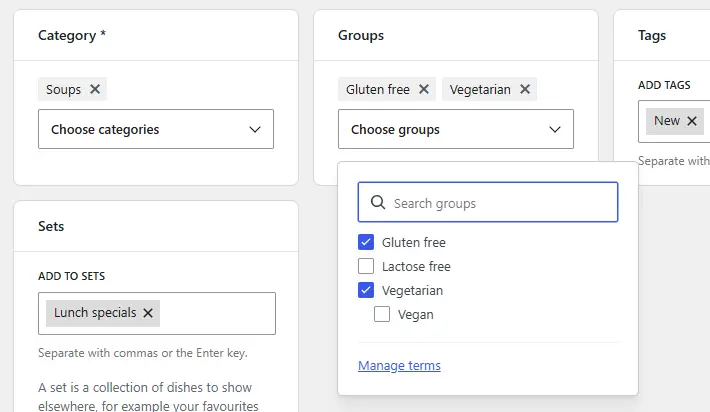
search groups

Sets #

How to use sets will be discussed later in the documentation. How to assign them is quite easy
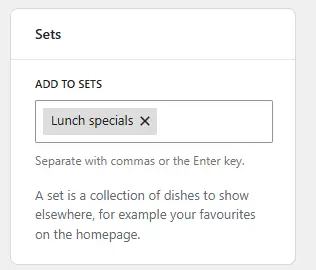
selecting sets menu

Just click in the field, the list appears and make your selection. If there are no sets yet, you most likely still have to add sets.

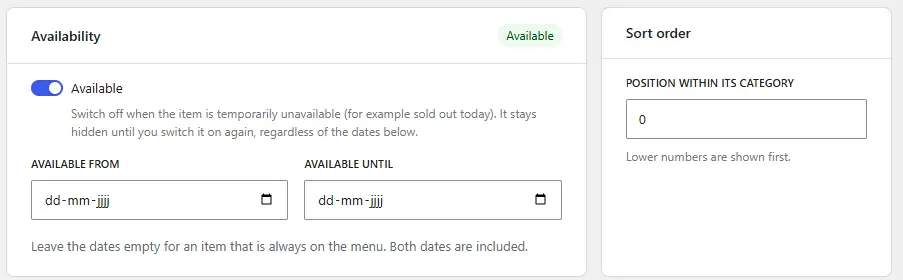
Availability and Sort order #
availability

Temporary not available #

When a menu item temporary isn’t available, you can remove it from the menu by unchecking the ‘Available’ switch’ which will hide the menu item from the menu.

Seasonal products #

When you enter a start- and end date (Available from – Available until) the menu-item only will be on the menu for that specific period. So you can offer seasonal products without having to update your website all the time.

Please note that if ‘Available’ is set to ‘on’ and the date is not within the range it’s available, it’s still not visible. The ‘Available’ batch in the right top of the card shows the actual availability for the current day.

Sort order #

The sort order inidicates the position of a menu item within the (sub-)category on the menu.

Updated on November 5, 2026

What are your Feelings

  • Happy
  • Normal
  • Sad

Share This Article :

  • Facebook
  • X
  • LinkedIn
  • Pinterest
The Categories menu
Table of Contents
  • Entering Basic Data
  • Category, groups and tags
  • Sets
  • Availability and Sort order
    • Temporary not available
    • Seasonal products
    • Sort order
WXP Plugins

Demo

Pricing

Affiliates

© 2026 WXP Plugins. All prices are in euro, excluding VAT.

WXPPlugins is a brand of WP Digital Marketing - The Netherlands - Chamber of Commerce (KvK) 75580152