
The icon sets #
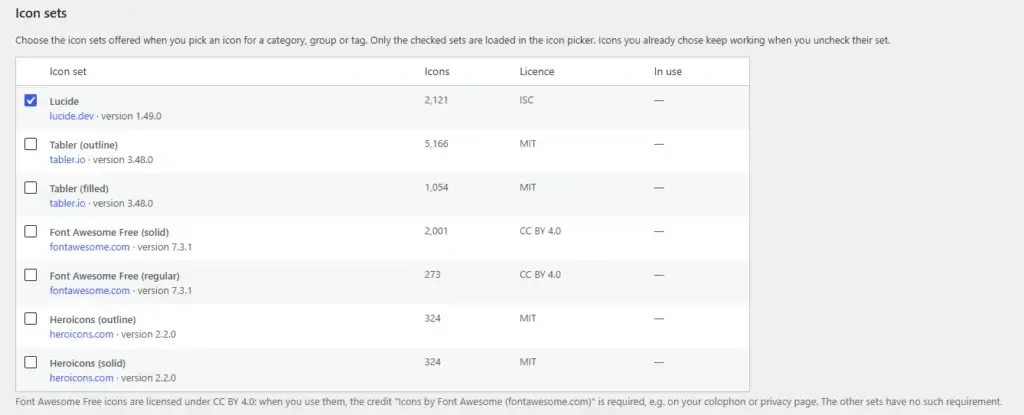
The first section of the Settings page is all about icon-sets. What is a menu without small little drawings with symbols you can directly recognize, such as for example, a small leaf on a green background!
There are quite a few icon sets offering hundreds, or even thousands of icons you can freely use and we bundled the most popular icon sets you can freely use. To avoid an ‘icon overload’ in your selection screens however -and to avoid a chaos of styles- It’s up to you which sets you want and do not want to use.
Although all icons included are free to use, some have special requirements, like right now Font Awesome. If there are any conditions regarding the use of icon sets, we’ve left a note under the selection screen. Please respect those conditions.
The other settings #
There are not a lot of settings. And those there are are quite easy to understand.
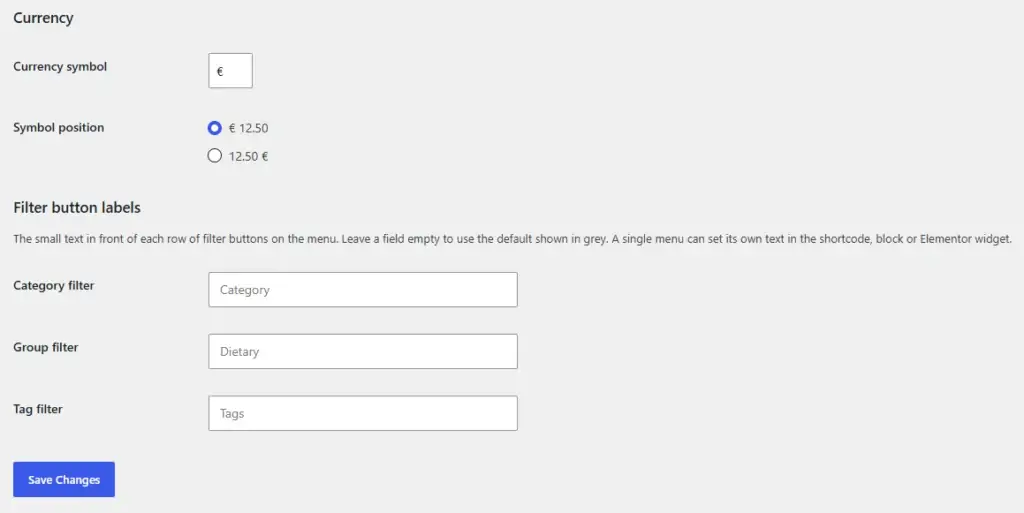
Currency #
For setting the currency format. Which symbol to use, and where the symbol has to be placed. The decimal and thousand separators are those set for the language/country matching the language set for the WordPress site.
Filter button labels #
As said before and as will be explained later, the ‘Categories’, ‘Groups’ and ‘Tags’ can be used in the way which suits you the best.
In the section ‘Filter button labels’ you can change the labels on the buttons into anything that makes sense to you.


