
Skip to content
WXP Plugins

Plugins

WXP Restaurant Menu

WXP Opening Times

WXP Local Events

WXP Restaurant Reservations

Demo

Pricing

Support

Docs

FAQ

Buy

Menu

Plugins

- WXP Restaurant Menu

- WXP Opening Times

- WXP Local Events

- WXP Restaurant Reservations

Demo

Pricing

Support

- Docs

- FAQ

Buy

WXP Opening Times

8
  • Installation
    • Installing WXP Opening Times
  • Basic operations
    • Creating your (first) schedule
    • Setting exceptions
  • For developers
    • Filter- and action hooks
    • Twig templates
    • WXP Opening Times shortcodes
  • Jewish and Islamic holidays
    • Installation
      • Installing WXP Opening Times: Jewish and Islamic holidays
    • For developers
      • Jewish and Islamic holidays: for developers

WXP Restaurant Menu

9
  • Installation
    • Installing WXP Restaurant Menu
  • Basic operations
    • Understanding the concept
    • The Settings for the WXP Restaurant Menu Plugin
    • The Icon menu
    • The Sets Menu
    • The Tags Menu
  • For developers
    • Filter- and action hooks
    • Twig templates
    • WXP Restaurant Menu shortcodes

WXP Local Events

8
  • Installation
    • Installing WXP Local Events
  • For developers
    • Filter- and action hooks
    • Twig templates
    • WXP Local Events shortcodes
  • Local Events for WooCommerce
    • Installation
      • Installing WXP Local Events for WooCommerce
    • For developers
      • Local Events for WooCommerce: for developers
  • Events Feed
    • Installation
      • Installing WXP Events Feed
    • For developers
      • Events Feed: for developers

WXP Restaurant Reservations

6
  • Installation
    • Installing WXP Restaurant Reservations
  • For developers
    • Filter- and action hooks
    • Twig templates
    • WXP Restaurant Reservations shortcodes
  • Rooms
    • Installation
      • Installing WXP Restaurant Bookings: Rooms
    • For developers
      • Rooms: for developers

General Developer Information

1
  • Twig
    • Twig templates in the WXP plugins

WXP Agency Kit

1
  • WXP Agency Kit: demo content from the command line
View Categories
  • Home
  • Documentation
  • WXP Restaurant Menu
  • Basic operations
  • The Sets Menu

The Sets Menu

1 min read

0:00 / 1:40
  • View as Markdown Open this page as plain Markdown (opens in a new tab)
  • Open in ChatGPT Ask questions about this page (opens in a new tab)
  • Open in Claude Ask questions about this page (opens in a new tab)
  • Open in Google AI Studio Ask questions about this page (Google account required) (opens in a new tab)

What are sets and why could I need them? #

Within the context of the WXP Restaurant Menu plugin a ‘set’ is a set of menu-items you could want to use together. And a ‘Set’ is closely related to the use of the ‘Menu Selection’ widget, shortcode or block.

The complete use of the Menu Selection widget will be explained later in this documentation, but the use of it is to present a number of menu items on special places on your webpages.

I’ll show it using Elementor Widgets, but using it with Blocks or Shortcodes works pretty much the same.

First you have to find the Menu Selection widget in Elementor. Like all WXP Widgets it’s situated in the WXP Plugins section.
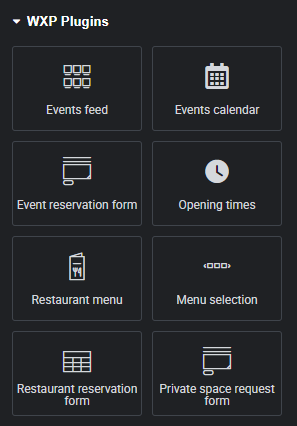
When you drag it on your canvas, it will look like this:

Not the most interesting view, is it?

So let’s take a look at the tool palet on the left site of the screen while the Menu Selection is selected.
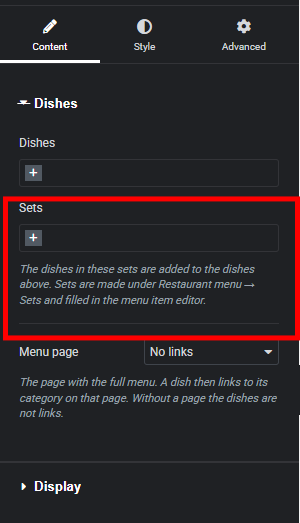
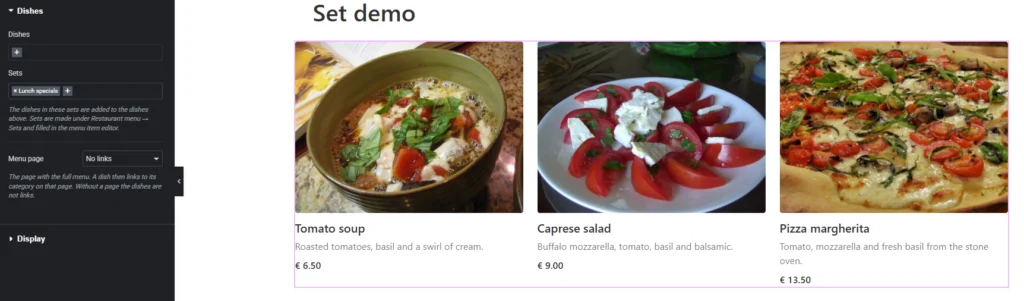
One of the attributes here is ‘sets’. When for example I chose ‘Lunch Specials’, from the sets (after pressing the + to do so) the widget suddenly shows some suggestions for lunch. Like you see in the image below.
How to define sets? #

Actually ‘defining sets’ is quite easy. When you start with the plugin the ‘Menu Sets’ most likely will empty. You just have to hit the button ‘Add New Menu Set’
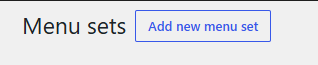
and the pop up below will show:
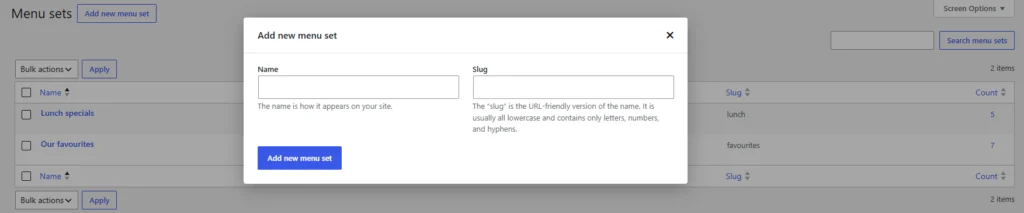
The only thing you really have to enter is the name, since the ‘Slug’ will be generated by the system, if you won’t enter a value for it.

When you want to edit an existing set, you just click it on the page. A now page with the set-data will show.

Updated on November 3, 2026

What are your Feelings

  • Happy
  • Normal
  • Sad

Share This Article :

  • Facebook
  • X
  • LinkedIn
  • Pinterest
The Icon menuThe Tags Menu

Leave a Reply Cancel reply

Your email address will not be published. Required fields are marked *

Table of Contents
  • What are sets and why could I need them?
  • How to define sets?
WXP Plugins

Demo

Pricing

© 2026 WXP Plugins. All prices are in euro, excluding VAT.

WXPPlugins is a brand of WP Digital Marketing - The Netherlands - Chamber of Commerce (KvK) 75580152